This website supports the analysis and download of videos and images from platforms such as Weibo, Miaopai, Lvzhou, YouTube, Twitter, Instagram, Facebook, Zuoyou, Weishi, Quanmin KTV, Quanmin Xiaoshouping, Momo, Meipai, Vimeo, Tumblr, Yunyinyin, Qutoutiao, Yingke, Xiaoying, Lishi Video, and Shouyin Translator. Please paste the link address obtained from the app into the input box below and click the "Analyze" button on the right to obtain the analysis address for videos, audios, images, and other materials. Videos and images belong to the relevant websites and authors, and this site does not store any videos or images.
1 Opening a sub-site can make money! Opening a sub-site enjoys cost price! Click on the left and below to learn more about sub-site agent joining!
-
Sign in or share on the Personal Center every day to obtain free extraction times. If you need help, you can contact QQ: 4203721 or WeChat: GaoXiaoDS
-
Supported platforms for single post extraction: YouTube, Instagram (including KuaiPai), Twitter, TK, Threads, Facebook, Vimeo, afreecatv, Tumblr, Triller, Likee, Twitch, Pinterest, Snapchat, Reddit, VK, Dailymotion, SoundCloud, Lemon8, Suno Music, Xiaohongshu, AcFun, Bilibili, Tmall, Xianyu, UC Video, Qutoutiao, Pipi Xia, Pipi Jiaoxiao, Weibo, Miaopai, Lvzhou, Xiaokaxiu, Meitu Xiuxiu, Meipai, Yun Music, CCTV, Xinhua News Agency, Huxiu, Huya, Douyu, Tangdou, Himalaya, Momo, Yingke, Thunder, WIDE Short Video, Zuoyou, Kaiyan, Kuran, Jianying, Qiangshi Baike, Li Video, and thousands of other platforms
-
Using the "Universal Audio and Video Sniffing" function of the computer version of the software, you can download music and videos from almost any webpage. You can download as long as you can play. For example, it supports downloading music/videos from websites such as 1688, Taobao, Zhihu, Douban, Kugou, JD.com, Phoenix Network, and Vipshop
Video/Image Downloader
Download videos, albums, and music from 1000+ websites
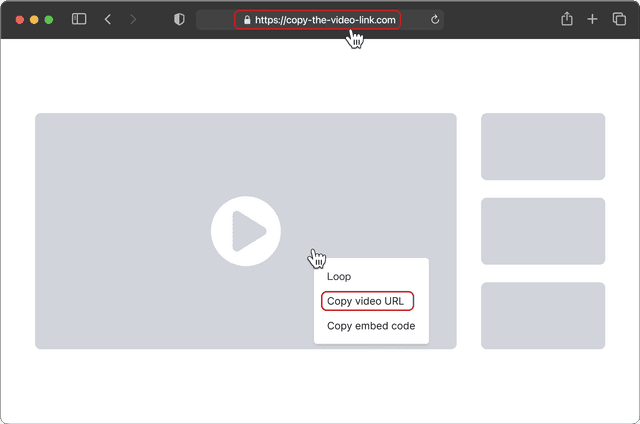
Copy the link by clicking Share and selecting Copy Link
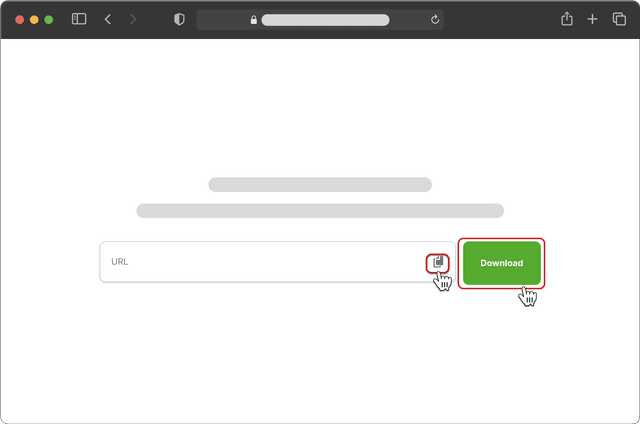
Paste the link into the input box and click Download
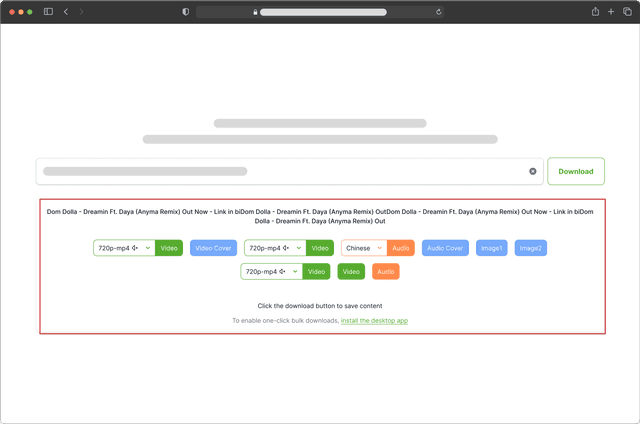
Choose video resolution or audio language to download
- Copy the link by clicking Share and selecting Copy Link
- Paste the link into the input box and click Download
- Choose video resolution or audio language to download
Get the full power with the desktop app
Enjoy batch downloads, universal resource detection, and advanced bulk editing for audio and video.
Universal media downloader
Easily detect and download audio or video from any webpage using the built-in browser. Automatically scans content and supports bulk downloads with no extra steps.
Playlist & channel bulk downloads
Download entire playlists, channels, or hashtag collections from YouTube, Instagram, Twitter, TikTok, Bilibili, and more—all in one click.
Supports 1000+ websites
Download videos, images, and audio from over 1000 popular sites like YouTube, X, Instagram, TikTok, VKontakte, Facebook, Bilibili, and more.
Ultra-HD quality – up to 8K lossless
Automatically download the highest available resolution—8K, 4K, or 1080P. Ideal for professional editing, cinematic viewing, or any use where quality matters.
Convert video to audio
Quickly extract audio from URL or local videos with one click. Convert to MP3 or other formats for editing, reuse in media libraries, offline playback, and more.
Multi-link downloads
Paste up to 20 post links at once. Download all videos or images in a single click.
Supported websites
Download videos, music, and images with ease — from all your favorite platforms.
Telegram
Vimeo
afreecatv
Tumblr
Likee
Dailymotion
TwitchSnapchat
PinterestRedditSoundCloud
Bilibili
Lemon8
Kwai
Suno Music
rednote
Truth Social
BeReal
Rumble
Spotify
WeChat Channels